The best donor survey questions are short, specific, and tied to a decision you will actually make. At year end, that means asking donors four things: why they give, how giving to you felt, how they want to hear from you, and what they plan to do next year. Then close with one open question.
Keep the survey to 5 to 10 questions, send it before your December appeals or in early January, and use the answers to shape your thank-yous, your messaging, and next year's plan.
Here's what this post covers:
- A bank of 40 donor survey questions grouped by theme, so you can pick what fits your goals.
- A 6-question sample template you can copy as written.
- Donor survey best practices for length, timing, and getting more completions.
- Step-by-step instructions for running your survey on an Anedot Lead Page, then thanking donors and inviting a year-end gift.
- A plan for your results, so the feedback turns into action.
Why run a donor survey at year end?

Year end is when your donors are paying the most attention to you and when your plans for next year are still taking shape.
Feedback you collect now gets used right away instead of sitting in a spreadsheet.
Your donors are already thinking about giving
Between Giving Tuesday (December 1, 2026) and December 31, many donors decide where their year-end gifts will go.
A short survey sent before that window reminds them of your mission without asking for money, and it gives them a reason to engage with you before your appeal arrives.
The answers can shape your December appeal
If donors tell you they care most about one program, lead with that program.
If they tell you they prefer short updates by email, send a short email. Your survey becomes research for the most important fundraising month of the year.
For the full campaign playbook, see our guide to year-end fundraising success.
Asking for feedback is stewardship
A survey tells donors their opinion matters, not just their gift.
That message supports retention, which is where long-term fundraising growth comes from.
Fundraising consultants such as Splendid Consulting focus on building loyal donor communities, and listening to donors is part of that.
Our guide to building donor relationships covers more ways to stay connected between asks.
It sets up next year
Year-end donor surveys surface the people who want to give monthly, volunteer, learn about planned giving, or hear from you less often.
That is a ready-made list of follow-ups for January.
When to send your year-end donor survey

Pick one of two windows, based on what you want to learn:
Early to mid November
Best if you want answers to shape your Giving Tuesday and December messaging.
Send it at least two weeks before your first appeal so you have time to read the results.
First two weeks of January
Best if you want donors to reflect on the full year and help you plan the next one. Inboxes are quieter, and you can pair the survey with a thank-you for the prior year's gifts.
Avoid the last two weeks of December
Inboxes are full of appeals, and a survey can get lost or feel like one more ask.
Who to send it to

You can send one survey to everyone, but a few segments are worth separate links or slightly different questions:
- First-time donors from this year: ask what inspired their first gift and how the giving experience felt.
- Recurring and monthly donors: ask what keeps them giving and how they want updates.
- Lapsed donors: ask a short, no-pressure version focused on what changed and how you could reconnect.
- Major donors: consider a phone call or personal note using a few of the same questions instead of a form.
- Volunteers and event attendees: ask about their experience and whether they would give or volunteer again.
Donor survey best practices

A good donor survey is short, has one clear purpose, works on a phone, and tells donors what you will do with their answers.
- Decide what you will do with the answers first. Every question should connect to a decision, such as which program to feature, how often to email, or who to call about monthly giving. If you would not act on the answer, cut the question.
- Keep it to 5 to 10 questions. Aim for a survey that takes two to three minutes. Tell donors the time up front: "This takes about 2 minutes."
- Use mostly multiple choice, plus one or two open questions. Multiple choice and yes/no questions are fast to answer and easy to tally. Open questions give you the quotes and ideas you would never think to ask about.
- Ask one thing per question. "How satisfied are you with our emails and events?" is two questions. Split it or pick one.
- Use neutral wording. "How would you rate our impact?" is better than "How much did you love our impact this year?" Leading questions give you flattering data you cannot use.
- Do not ask what you already know. Skip questions about gift amount or date if that information is already in your records.
- Make it mobile-friendly and one page. Many donors will open your survey from an email on their phone. A single, simple page with a clear submit button works best.
- Be clear about privacy. If you ask for a name and email so you can follow up, say so. If a question is sensitive, make it optional.
- Send one reminder. A single follow-up to people who have not responded, about four to seven days later, is usually enough. More than that starts to feel like pressure.
- Close the loop. Tell donors what you learned and what you are changing. Many nonprofits skip this step. It is also what makes donors willing to answer next year.
How to get donors to complete your survey
The biggest driver of completions is a personal, specific invitation from someone donors recognize.
Use more than one channel:
- Email from a real person, such as your executive director, with a short, plain subject line. Examples: "Can I ask you 5 quick questions?", "Your input on next year", or "2 minutes to help us plan 2027".
- Your thank-you messages: add the survey link to gift thank-yous sent in November and December.
- Your website: add a banner or button on your homepage and donation thank-you page.
- QR codes: print a code on year-end mailers, event tables, and programs so donors can answer on their phones.
- Text message and social posts: share the link with a one-line reason it matters.
40 donor survey questions to ask

These donor survey questions are grouped by theme.
Pick one or two from each group for a balanced survey, or pull a full group if you have a specific goal, such as growing monthly giving.
Replace [Organization] with your name. The note after each question suggests a format.
Motivation and connection
- What first inspired you to give to [Organization]? (open text)
- Which part of our work matters most to you? (multiple choice: list your programs)
- How would you describe your connection to our mission? (multiple choice: I or my family have been served, I volunteer, a friend introduced me, I care about the cause, other)
- What was the main reason you chose to give this year? (open text)
- What do you hope your gift accomplishes? (open text)
- How long have you supported [Organization]? (multiple choice: less than 1 year, 1 to 3 years, 4 to 10 years, more than 10 years)
- Do you support other organizations working on similar causes? (yes/no)
- In one sentence, how would you describe [Organization] to a friend? (open text)
Giving experience and satisfaction
- How easy was it to make your most recent gift? (multiple choice: very easy, easy, neutral, difficult, very difficult)
- How did you make your most recent gift? (multiple choice: online, by mail, at an event, by text, in person)
- Did you receive a thank-you after your gift? (yes/no)
- How satisfied are you with how we thanked you? (multiple choice: very satisfied to very dissatisfied)
- Do you feel you know how your gift was used? (yes/no)
- Was there anything that almost stopped you from giving? (open text)
- How likely are you to recommend [Organization] to a friend or family member? (0-10 scale)
- How would you rate your overall experience with [Organization] this year? (multiple choice: excellent, good, fair, poor)
Communication preferences
- How would you like to hear from us? (choose all that apply: email, mail, text, phone, social media)
- How often would you like to receive updates? (multiple choice: monthly, quarterly, a few times a year, once a year)
- Which updates are most valuable to you? (choose all that apply: impact stories, program news, financial reports, event invitations, volunteer opportunities)
- Do you usually read our email updates? (yes/no)
- Do we contact you too often, not often enough, or about the right amount? (multiple choice)
- What topic would you like to hear more about next year? (open text)
- Would you like to receive our annual report? (yes/no)
- Is there a better email address or phone number for reaching you? (open text)
Giving plans and involvement
- Do you plan to give to [Organization] again in the next 12 months? (multiple choice: yes, maybe, not right now)
- Would you like to learn more about becoming a monthly donor? (yes/no)
- Does your employer offer a matching gift program? (multiple choice: yes, no, not sure)
- Have you considered including [Organization] in your will or estate plans? (multiple choice: I already have, I would like to learn more, not at this time)
- Would you like to volunteer with us in the coming year? (yes/no)
- Would you be interested in sharing our work with friends or hosting a small fundraiser? (yes/no)
- What would make you more likely to increase your support next year? (open text)
- Which types of events would you attend? (choose all that apply: in-person gathering, online briefing, volunteer day, tour or site visit)
- Would you be open to a short call with a member of our team? (yes/no)
Open feedback
- What is one thing we did well this year? (open text)
- What is one thing we could do better next year? (open text)
- If you could change one thing about [Organization], what would it be? (open text)
- Is there a story or moment this year that made you proud to support us? (open text)
- What questions do you have about our work or how we use donations? (open text)
- May we share your comments, without your name, in our updates? (yes/no)
- Is there anything else you would like us to know? (open text)
Donor survey questions to avoid
- Double-barreled questions that ask two things at once.
- Leading questions that suggest the "right" answer.
- Questions you already have answers to, such as gift amount or date.
- Too many open questions. More than two or three makes the survey feel like homework.
- Internal jargon, such as program code names or terms only your staff use.
Sample year-end donor survey template (6 questions)

Use this short nonprofit survey template as written, or swap in questions from the bank above. It takes most donors about two minutes.
Intro text for the top of your survey page:
Thank you for being part of [Organization] this year. As we plan for 2027, we would love two minutes of your time. Your answers will shape how we share our work and how we stay in touch with you.
Contact fields: Email (required), First and last name.
Questions:
- Which part of our work matters most to you? (choose one: [Program A], [Program B], [Program C], all of it)
- How easy was it to give to us this year? (choose one: very easy, easy, neutral, difficult, very difficult)
- How would you like to hear from us? (choose all that apply: email, mail, text, social media)
- Do you plan to give to [Organization] again in the next 12 months? (choose one: yes, maybe, not right now)
- Would you like to learn more about becoming a monthly donor? (yes/no) See how to build a monthly giving program.
- What is one thing we could do better next year? (open text)
Permission: a checkbox that lets donors opt in to future emails or texts.
Thank-you message after submit:
Thank you, {first_name}! Your feedback helps us plan a stronger year ahead. We will share what we learned in an upcoming update.
Ready to use this template? Start free, then go to Action Pages > Pages > + New Page > Lead Page. The next section walks through every step.
How to run a donor survey in Anedot with a Lead Page
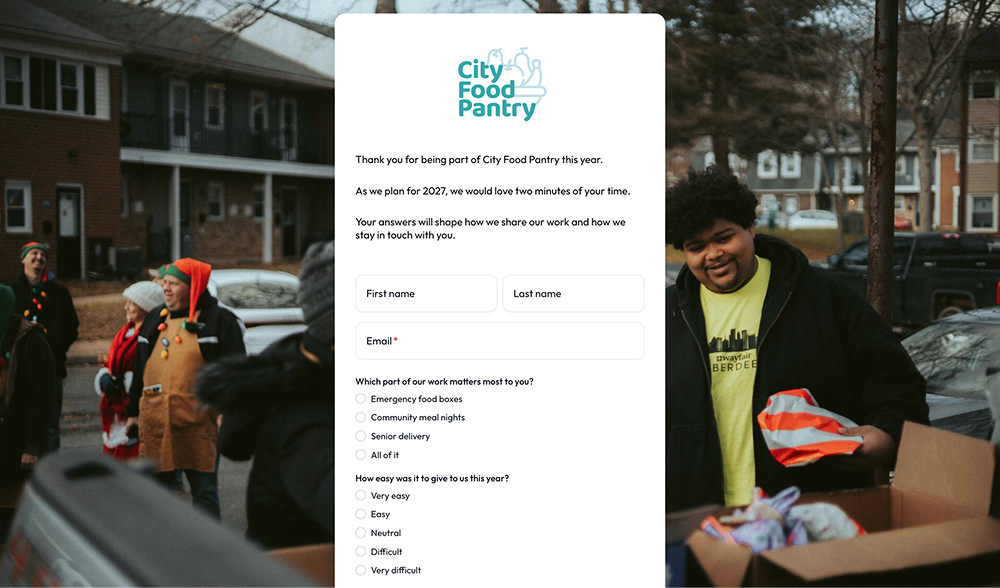
You can run your year-end donor survey in Anedot using a Lead Page, so you do not need a separate survey tool.
Lead Pages are non-financial Action Pages. They collect names, emails, phone numbers, and other details without processing donations, so they work well for surveys, email signups, and petitions.
Learn more on the Surveys feature page.
Match your questions to Lead Page fields
Before you build, map each question to a field type. Lead Pages support these survey-friendly fields:
Step-by-step: build and launch your survey

- Create the page. In your Anedot account, go to Action Pages > Pages, click + New Page, and choose Lead Page.
- Name it and set the URL. Give the page an internal name, such as "Year-End Donor Survey 2026," and a clear Page Slug, such as eoy-survey-2026. Each slug must be unique in your account.
- Design the page. In the Design tab, add a title, your logo, and a short intro explaining why you are asking. You can add text, an image, or a short video from your executive director, and apply your brand colors. If you want to show a deadline, you can add a Timer. Note that the Timer is a visual countdown and does not close the page on its own.
- Build the form. In the Form tab, add Email (set to required) and Name, then add your questions using Selection List, Question, and Text fields. Add Communications Consent if you plan to follow up by email or text. Every custom question you add is saved as an Account Field, so you can reuse it next year.
- Set up what happens after submit. In the Workflows tab, write your Confirmation Page message, or add a Callback URL or Post-conversion Upgrade (more on these in the next section). Lead Page submissions do not send an email receipt, so your Confirmation Page message is your on-page thank-you.
- Fill in the settings. Add an SEO title and meta description, a social share image and description, any tracking codes you use (such as Google Analytics or Meta Pixel), and a Source Code if you want to track where responses come from.
- Publish and share. Click Publish, then copy your Share URL. We recommend sharing the hosted page link instead of an embed. You can also add #form to the end of the link to send donors straight to the questions, download a QR code for print, or use an SMS keyword.
- Watch responses come in. Open View Submissions for the page, or go to Action Pages > Submissions and filter by page. You can export responses to CSV, and submissions can also sync to connected email tools such as Mailchimp.
- Pause the page when your survey closes. This stops new submissions once your survey window ends.
For screenshots and field-by-field details, see the Lead Page Builder and Manage Pages Help Center articles.
For sharing options, see Share an Action Page. For design tips, read how to create the perfect landing page.
Tip: To compare segments, create one link per group (for example, first-time donors and monthly donors) using a different Source Code or Hidden field value. Your CSV export will show which group each answer came from.
After the survey: thank donors and invite a year-end gift (optional)

The moment after a donor finishes your survey is a natural time to say thank you and, for some audiences, to invite a gift.
You have three options on the Lead Page Workflows tab.
Option 1: Thank them on the Confirmation Page
Write a short, warm message on the Confirmation Page.
You can personalize it with variable tags such as {first_name}. This is the best choice when the survey is purely about listening, such as a survey for lapsed or major donors.
Option 2: Redirect with a Callback URL
A Callback URL sends donors to another page after they submit, such as a custom thank-you page on your website or your year-end Donation Page.
A Callback URL replaces the Anedot Confirmation Page, so put your thank-you message on the page you redirect to. The Action Page Builder tutorial walks through this setup.
Option 3: Add a Post-conversion Upgrade to a Donation Page
A Post-conversion Upgrade redirects supporters to one or more other Action Pages after their submission. Build your year-end Donation Page first.
Then return to the Lead Page Builder and open the Workflows > Upgrades tab. Select Add post-conversion upgrade, then click + Create New.
Add a Name, set breakpoints if you need them, click + Add New to connect your Donation Page (or pages), and click Save. Back on the Upgrade tab, choose Add post-conversion recurring from the Upgrade Workflow list, select your new upgrade from the dropdown, then click Publish in the upper right corner of the Builder.
Keep the tone light.
The survey itself should not ask for money. On the next page, make the gift clearly optional, for example: "Thank you for sharing your thoughts. If you would like to help us start 2027 strong, you can make a year-end gift here."
Because a Lead Page does not collect payment, there is no processing fee when a donor submits your survey.
Standard processing fees apply only to donations made on your Donation Page. See Anedot pricing for details.
What to do with your donor survey results

Turn your results into two or three concrete changes, follow up with the donors who raised their hands, and tell everyone what you learned.
- Export your responses. Download the CSV from Submissions and open it in a spreadsheet.
- Tally the closed questions. Count answers for each multiple choice and yes/no question. Look for clear majorities and surprises.
- Read every open answer. Tag each one with a theme, such as communication, impact, or giving experience. Pull two or three quotes you can share, with permission.
- Compare segments. If you used separate links or Source Codes, compare first-time donors with recurring donors. Differences tell you where to focus.
- Update donor records. Add communication preferences to your CRM or email tool so the next message matches what each donor asked for.
- Follow up within two weeks. Reach out personally to donors who said yes to monthly giving, planned giving information, volunteering, or a call.
- Shape your next appeal. Use the words donors used to describe your work. Their language is often clearer than internal terms.
- Close the loop. Share a short "You told us, here is what we are doing" update in your January newsletter or annual report. For inspiration, see these annual report examples.
- Repeat next year. Ask a few of the same questions every year so you can track change over time.
Start your year-end donor survey

A short, well-timed donor survey gives you better appeals, stronger relationships, and a clear list of next steps for the new year.
Pick five or six questions from the bank above, then build the survey on a Lead Page and decide whether to thank donors on the Confirmation Page or invite a year-end gift next.
Build your donor survey free. Go to Action Pages > Pages > + New Page > Lead Page.
New to Anedot? Start free.
Anedot is $0 per month with unlimited Donation, Event, and Lead pages, and you only pay processing fees on donations.
Learn more on the Surveys feature page or Anedot for nonprofits.
Frequently asked questions
What are some good survey questions to ask donors?
Good donor survey questions ask why donors give, which part of your work matters most to them, how easy giving was, how they want to hear from you, and whether they plan to give again. End with one open question, such as "What is one thing we could do better?" Each question should connect to a decision you will make.
What are 5 good survey question examples?
Five strong donor survey questions are: (1) What first inspired you to give? (2) Which part of our work matters most to you? (3) How would you like to hear from us? (4) Do you plan to give again in the next 12 months? (5) What is one thing we could do better?
How long should a donor survey be?
A donor survey should usually be 5 to 10 questions and take two to three minutes. Use mostly multiple choice and yes/no questions with one or two open questions. Shorter surveys get more completions and are easier to act on.
When should a nonprofit send a year-end donor survey?
Send it in early to mid November if you want answers to shape Giving Tuesday and December appeals, or in the first two weeks of January if you want donors to reflect on the full year. Avoid the last two weeks of December, when inboxes are crowded with appeals.
How do you get donors to complete a survey?
Send a personal invitation from a recognizable leader, say how long it takes, keep it short, and make it easy to answer on a phone. Share the link by email, on your website, with a QR code, and by text, and send one reminder four to seven days later.
Should donor surveys be anonymous?
It depends on your goal. Anonymous surveys can get more candid feedback. Named surveys let you follow up with donors who want to give monthly, volunteer, or talk with your team. Many nonprofits ask for an email address and make sensitive questions optional.
Can you collect survey responses and invite a gift in the same flow?
Yes. In Anedot, you can build your survey on a Lead Page and then send respondents to a Donation Page using a Callback URL or a Post-conversion Upgrade. Keep the survey ask-free and make the gift invitation clearly optional.
How do you create a donor survey without a separate survey tool?
If you use Anedot, create a Lead Page under Action Pages > Pages > + New Page, then add Selection List, Question (yes/no), and Text fields for your questions. Publish the page, share the link, and review responses in Submissions or export them to CSV.
Does Anedot charge to run a donor survey?
Anedot is $0 per month and includes unlimited Donation, Event, and Lead pages. Lead Pages do not process payments, so there is no processing fee when someone submits a survey. Processing fees apply only to donations.
80 Community Service Ideas for Nonprofits