Fees and features as of November 2026. Payment apps change their pricing often, so check each vendor's page before you decide. Every rate below links to the vendor's own page.
Can nonprofits use Venmo, PayPal, Cash App, or Zelle?
Yes, nonprofits can use Venmo, PayPal, Cash App, and Zelle, but not in the same way. Venmo and PayPal offer charity options for confirmed 501(c)(3)s.
Cash App's business account is built for selling goods and services, and Zelle's fees and limits depend on your bank. None of the four gives you a full giving platform.
These apps are popular for a reason. They are fast, familiar, and already on many donors' phones.
In a 2025 Nonprofit Tech for Good survey of 641 online donors, 17% said they prefer to give online with PayPal and 8% with Venmo, though credit cards still led at 39%.
In the 2026 M+R Benchmarks Study, 79% of participating nonprofits offered PayPal on their donation pages and 44% offered Venmo.
But taking a payment is only one part of receiving a gift. Your team also has to thank the donor, send a receipt, keep recurring gifts running, and reconcile deposits. That is where the differences show up.
This guide explains what each app offers organizations, what it costs, and where it falls short.
Then it covers when a payment app is enough and when nonprofits, churches, campaigns, and schools are better served by a platform built for giving.
Venmo, PayPal, Cash App, and Zelle compared (as of November 2026)
Rates are for US organizations receiving domestic payments. Sources are linked in each app's section below.
| Feature | Venmo | PayPal | Cash App | Zelle | Anedot (Platform) |
|---|---|---|---|---|---|
| Nonprofit option | Charity profile for PayPal confirmed charities | Confirmed charity status for US 501(c)(3)s | Business account only; no charity account found | Small business accounts, if your bank offers them | Built for nonprofits, churches, campaigns, and schools |
| Fee to the organization | 1.9% + $0.10 per donation | 1.99% + $0.49 charity rate; 2.89% + $0.49 standard Donate button rate | 2.6% + $0.15 per payment; 3% Tap to Pay | Set by your bank | 501(c)(3)s: 3.3% + $0.30 cards and wallets, 0.3% + $0.30 ACH. No monthly or setup fee. Donor Covers Fees lets donors cover the fee, so you keep the full amount they chose to give |
| Tax receipts | Automatic donation receipt to the donor | Payment receipts; PayPal isn't required to provide tax documents | None described | None | Automated receipts and year-end donor statements |
| Donor data and CRM | Donor names and emails, for acknowledgment and receipts only | Payment records in your PayPal account | Activity tab with payments and fees | Payments in your bank account | Your organization owns its data; integrations with CRMs and accounting tools |
| Recurring giving | Not described for charity profiles | Monthly donations through the Donate button | None described | Not described by Zelle | Weekly, monthly, and other schedules, plus a Donor Account and card updater |
| Branded giving page | Venmo profile with photos and a QR code | Donate button; gift is completed on PayPal's site | $cashtag profile | Email, phone number, or Zelle tag | Customizable donation pages on your own subdomain, set up by our Support team |
| Payouts | Standard transfer free; same-day access for a fee; weekly bank transfer limits | Standard bank withdrawal free; instant 1.5% | Standard transfer free; instant 0.5% to 2.5% | Straight to your bank, usually within minutes | Automatic deposits every 2 days, weekly, or monthly |
| Donor protection and reversals | Donations are not covered by Venmo Purchase Protection | Dispute and chargeback fees apply to the organization | Not described | Payments to enrolled users can't be reversed | $15 per chargeback |
| Security | Encryption and account monitoring | PCI DSS compliant; data encryption; 24/7 fraud monitoring | Encryption and 24/7 fraud monitoring | Authentication and monitoring features | SOC 2 and PCI compliant |
Venmo for nonprofits

Venmo is a peer-to-peer payment app owned by PayPal. Organizations have one donation-specific option on Venmo: the charity profile.
Venmo's user agreement defines personal payments as payments that are not a donation or a commercial transaction, so a staff member's personal account is not the right place to collect gifts.
- Who qualifies: Venmo charity profiles are for charitable organizations and 501(c)(3)s. You start with a PayPal business account, confirm your charity status on PayPal, then create the profile from the PayPal App Center. The owner of the PayPal charity account must be the same person who owns the Venmo account, and ownership can't be transferred.
- Fees: Venmo charges charity profiles 1.9% + $0.10 for each donation of $1 or more. A $100 gift nets $98. Venmo says it can't refund this fee. Donors pay nothing, even when they give with a credit card.
- Receipts: Venmo automatically emails a donation receipt to the donor for each gift, on your behalf. You can't turn it off.
- Donor data: You can download statements with donor contact details, but Venmo asks that donor emails be used only to acknowledge gifts and for tax receipts, not for general marketing.
- Recurring giving: Venmo's charity help pages don't describe a recurring donation option.
- Payouts and limits: There is no limit on the number or amount of donations a charity profile can receive. Bank transfers have weekly rolling limits of $100,000 for standard transfers and $50,000 for instant transfers. On Venmo's fee page, standard transfers are free and Instant Transfer costs 1.75% (minimum $0.25, maximum $25).
- Management: Charity profiles are managed in the Venmo app. Per Venmo's charity profile FAQ, you can view statements on the web but can't manage the profile there.
- Risks: Venmo's user agreement says donations are not eligible for Venmo Purchase Protection. A charity profile can also be paused if your organization falls out of good standing with the IRS or California regulators.
Venmo business profiles are a separate product for selling goods and services, at 1.9% + $0.10 per payment (2.29% + $0.09 for Tap to Pay). Venmo says a business profile can't be converted into a charity profile.
For a closer look at Venmo next to a giving platform, see our Venmo alternative page.
PayPal for nonprofits
PayPal offers the most donation-specific tools of the four. Its Donate button lets organizations take one-time and monthly gifts, and confirmed charities get a discounted rate.
- Who qualifies: For confirmed charity status, your organization must be a valid US 501(c)(3) or equivalent, and you must show the primary account user is authorized to act for it. PayPal says you can often confirm by adding a charity bank account.
- Fees: On PayPal's merchant fee page, last updated October 1, 2026, confirmed charity transactions cost 1.99% plus a $0.49 fixed fee. Not every payment type qualifies. Without charity status, the Donate button and PayPal Checkout for Donations cost 2.89% plus $0.49. International donations add 1.5%.
- Receipts: PayPal says it isn't required to provide tax documents, though it provides payment receipts. Plan to send your own acknowledgments.
- Recurring giving: Donors can choose an automatic monthly donation, and both the donor and the organization can change or cancel it in their PayPal settings, per PayPal's donations help page.
- Giving experience: Donors finish their gift on PayPal's site rather than on your website. There are no monthly or setup fees for the Donate button.
- Payouts: Standard withdrawals to a linked bank account are free. Instant transfers cost 1.5% of the amount, with a $0.50 minimum.
- PayPal Giving Fund: If eligible, confirmed charities are enrolled in PayPal Giving Fund and can receive grants from partner grant makers, with no fee to receive them. PayPal does not guarantee any grants.
- Risks: PayPal lists a $15 standard dispute fee and a $20 card chargeback fee. Charity pricing can end if your account loses confirmed charity status.
For a closer look at PayPal next to a giving platform, see our PayPal alternative page.
Cash App for nonprofits
Cash App is a peer-to-peer payment app. If you have a personal Cash App account, you can create a free Business account in the app and verify your business.
The catch for nonprofits: Cash App's own help page says business payments are "those completed for the sale of goods or services." We found no charity or nonprofit account type on Cash App's help pages, so ask Cash App before using it for donations.
- Fees: A Cash App Business account pays 2.6% + $0.15 on each payment received from a customer's Cash App account, and 3% for Tap to Pay.
- Receipts and recurring giving: The Cash App help pages we reviewed don't describe donation receipts or recurring donations.
- Donor data: Payments and fees appear in the app's Activity tab.
- Payouts: Standard transfers are free and usually arrive in 1 to 3 business days. Instant transfers cost 0.5% to 2.5% (minimum $0.25 to $1, maximum $75).
- Limits: Unverified accounts can send and receive up to $1,000 in a rolling 30 days. Verified accounts get receive limits set per account.
- Risks: Business accounts are positioned for sales, and your personal account sits right beside them in the same app, so keep donations out of personal accounts. Cash App itself says keeping personal and business payments separate helps with money management and tax prep.
Zelle for nonprofits
Zelle is a bank-to-bank network built into more than 2,400 bank and credit union apps. Both the donor and your organization need US bank accounts.
There is no Zelle charity account. Your organization can use Zelle only if your bank offers it for your business account type.
- Fees: For small business accounts, Zelle's small business FAQ says "it depends" and points you to your bank's terms.
- Limits: Your bank or credit union sets how much you can send and receive, and each donor's bank sets their limits too.
- Receipts, donor data, and recurring giving: Zelle's FAQ doesn't describe donation receipts, donor records, or recurring donations. Payments arrive in your bank account, and you keep the rest of the records yourself.
- Taxes: Zelle says it does not report Zelle Network transactions to the IRS, so you are responsible for your own records.
- Risks: Per Zelle's FAQ, payments to enrolled users can't be reversed or canceled, and Zelle advises sending money only to people and businesses you trust. That puts the burden on donors to be sure they are paying the real organization.
Zelle says qualifying impostor scams may be eligible for reimbursement and directs people to their own bank, so a donor who pays a fake account has to sort it out with that bank, not with your organization.
When a payment app is fine, and when you need a giving platform

A payment app can be a reasonable extra option. It is rarely enough as your main way to receive gifts.
A payment app can work when
- You are collecting small, one-time gifts in person: a Venmo charity profile QR code on a table at an event is quick for donors who already use Venmo.
- You already have a confirmed charity account: a PayPal Donate button or Venmo charity profile can sit alongside your main giving page for donors who ask for it.
- Volume is low: a handful of gifts a month is easy to receipt and reconcile by hand.
You need a giving platform when
- Recurring giving matters: monthly donors need easy ways to update a card or change an amount. In the 2026 M+R Benchmarks Study, monthly giving accounted for 27% of all online revenue in 2025, and after a full year, 71% of sustainers were still active.
- You owe donors receipts and year-end statements: donors claiming $250 or more need a written acknowledgment, and doing that by hand from app exports takes time. The IRS explains the rule in its guide to substantiating charitable contributions.
- You want donor data in your CRM: apps that limit how you use donor emails, or don't share donor details, make stewardship harder.
- You run several funds, events, or campaigns: you need to know which gift went where without reading payment notes.
- You aren't a 501(c)(3): campaigns and other organizations without 501(c)(3) status don't qualify for Venmo charity profiles or PayPal's charity rate.
- Most of your donors give on their phones: a mobile-friendly page with Apple Pay and Google Pay gets the speed of an app without giving up receipts and data. In the 2026 M+R Benchmarks Study, mobile users made up 52% of traffic but 43% of donation transactions, and 8% of mobile visitors to a main donation page completed a gift, compared to 11% on desktop.
Why use a purpose-built giving platform like Anedot
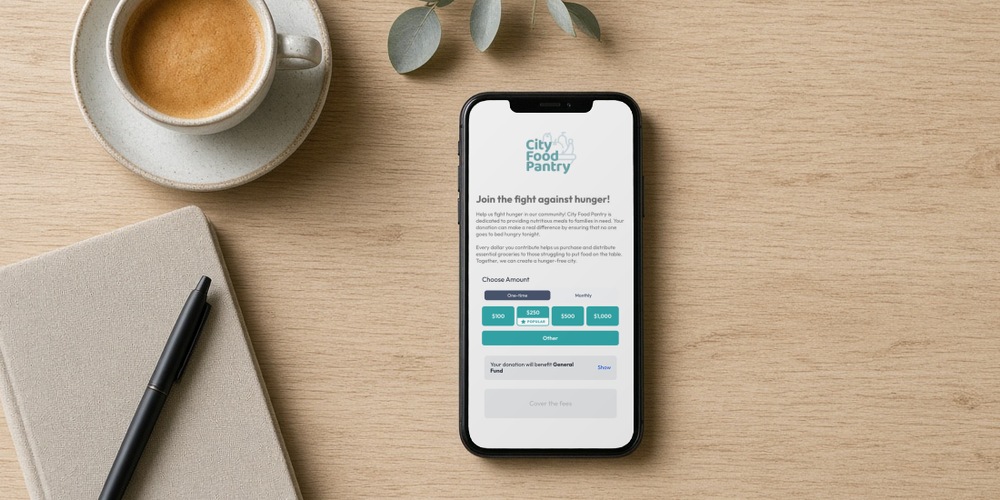
Anedot is both a donation platform and a payment processor, so there is no separate merchant account to set up.
Anedot is trusted by 30,000+ organizations for giving tools that save time and money. Here is what that means in practice:
- Pay 0% processing with DCF: Donor Covers Fees lets donors cover the processing fee, so your organization keeps the full amount the donor chose to give.
- Free to start, pay as you raise: Anedot's pricing has no monthly fees, no setup fees, and no contracts, and every account includes every feature. 501(c)(3)s, including churches, pay 3.3% + $0.30 per card, PayPal, Apple Pay, or Google Pay transaction and 0.3% + $0.30 per ACH transaction. A few situations carry added fees: international cards add 1%, chargebacks are $15 each, and ACH returns are $2 each. See the full breakdown on our pricing page.
- No integration fees: connect QuickBooks Online, Salesforce, HubSpot, Mailchimp, Constant Contact, and Planning Center so gifts flow into the tools you already use. Browse all Anedot integrations.
- Donors still pay the way they like: Anedot's payment methods include credit and debit cards, ACH bank transfers, Apple Pay, Google Pay, and PayPal, with Bitcoin as an option you can turn on. Your donors who like PayPal can use it on your own page. Learn more about flexible payment options.
- Recurring giving built in: donors pick a weekly, monthly, or other schedule for recurring giving. A Credit Card Updater refreshes expiring cards, and donors can update or cancel gifts in the Donor Account.
- Receipts and year-end statements: receipts go out automatically after each gift, and Donor Statements summarize each donor's year, with a tax-deductible column for nonprofit accounts.
- Your donor data stays yours: Anedot does not sell or share personal information, and the organization that collects it owns it. Anedot is SOC 2 and PCI compliant.
- Free text-to-give: each account can set up two SMS keywords that text donors a link to your donation page, alongside share links and QR codes. Our text-to-give guide walks through the setup.
- Deposits on your schedule: payouts go to your bank every 2 days, weekly, or monthly, and your bank may take a few business days to post each deposit. You can route funds to more than one bank account.
- Branded pages: build customizable donation pages, and use your own subdomain, such as give.yourorg.org, set up by our Support team.
- Fast setup: the application takes a few minutes, and most accounts are verified within 1 to 2 business days. Some organization types need extra review.
Get started

Payment apps are useful, but your donors deserve more than a payment notification, and your team deserves more than a spreadsheet of app exports.
Anedot gives you branded giving pages, recurring giving, receipts, and clean deposits, with no monthly fees and no contracts. Opening an account is free. Create your free account.
Frequently asked questions
Is Anedot free to use?
Yes, Anedot does not charge monthly fees, platform fees, or integration fees.
With Donor Covers Fees enabled, 501(c)(3) nonprofits can pay 0% processing fees when donors choose to cover the processing costs.
Can nonprofits use Venmo?
Yes. A 501(c)(3) can open a Venmo charity profile after confirming its charity status on PayPal.
Charity profiles pay 1.9% + $0.10 per donation of $1 or more, donors pay no fee, and Venmo emails donors a donation receipt. Personal Venmo accounts are not meant for collecting donations.
Does Venmo charge nonprofits a fee?
Yes. Venmo charges charity profiles 1.9% + $0.10 for each donation of $1 or more, so a $100 gift nets $98.
Venmo says it can't refund this fee. Instant transfers to your bank cost extra; standard transfers are free.
What is PayPal's fee for nonprofits?
Once PayPal confirms your charity status, eligible charity transactions cost 1.99% plus a fixed fee of $0.49. Without that status, PayPal's standard rate for its Donate button is 2.89% plus $0.49. International gifts add 1.5%.
Can a church or nonprofit use Cash App for donations?
Cash App offers Business accounts at 2.6% + $0.15 per payment, but Cash App describes business payments as sales of goods or services. We found no charity or nonprofit account type, tax receipts, or recurring giving tools on its help pages, so check with Cash App first.
Is Zelle a good way to accept church or nonprofit donations?
Zelle moves money from bank to bank, usually within minutes, but only if your bank offers Zelle for your business account type. Your bank sets fees and limits, and Zelle payments can't be reversed once sent to an enrolled user. Zelle's FAQ doesn't describe donation receipts.
Do Venmo, PayPal, Cash App, or Zelle send tax receipts?
Only Venmo charity profiles send an automatic donation receipt to the donor. PayPal says it isn't required to provide tax documents, though it provides payment receipts.
Cash App and Zelle don't describe donation receipts. A giving platform sends receipts and year-end statements for you.
Can donors still pay with PayPal on our own donation page?
On Anedot, yes. Anedot donation pages accept PayPal along with credit and debit cards, ACH bank transfers, Apple Pay, and Google Pay, and you can turn on Bitcoin as an option. Cash App and Zelle aren't Anedot payment methods.
80 Community Service Ideas for Nonprofits